
Range Rover Evoque: Front Lower Arm
Removal
NOTES:
Some variation in the illustrations may occur, but the essential information is always correct.
Front wheel drive transmission illustrations shown, all wheel wheel drive transmission is similar.
1. WARNING: Make sure to support the vehicle with axle stands. Raise and support the vehicle.
2. Refer to: Wheel and Tire (204-04 Wheels and Tires, Removal and Installation).
3.

4.

Installation
1. CAUTION: Only tighten the nut and bolt finger tight at this stage.

2. CAUTION: Only tighten the nut and bolt finger tight at this stage.
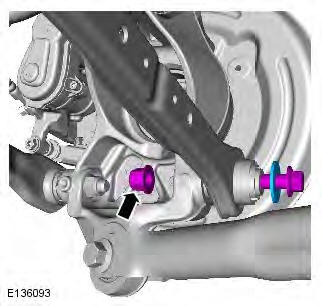
3. CAUTION: Nuts and bolts must be tightened with the weight of the vehicle on the suspension.
Support weight of vehicle on a jack at the rear hub.
4. Torque: 175 Nm

5. Torque: 175 Nm

6. Refer to: Wheel and Tire (204-04 Wheels and Tires, Removal and Installation).
READ NEXT:
 Rear Lower Arm AWD
Special Tool(s)
205-857
Remover, Halfshaft
Removal
CAUTION: LH illustration shown, RH is similar.
NOTE: Some variation in the illustrations may occur, but the essential
information is always correct.
Rear Stabilizer Bar
Removal
NOTES:
Some variation in the illustrations may occur, but the essential
information is always correct.
Removal steps in this procedure may contain installation details.
1. WARNING: Make sure
Wheel Knuckle
Special Tool(s)
205-857
Remover, Halfshaft
JLR-204-804
Lever, Wheel Knuckle
Removal
CAUTIONS:
Nuts and bolts must be tightened with the weight of the vehicle on the
suspension.
Do not allow halfshaf
SEE MORE:
Stop/start (manual transmission only)
The Stop/Start system has been designed to
improve fuel efficiency. The system is
automatically activated when the ignition is
switched on.
When the engine has been stopped by the
stop/start system, the ECO icon will illuminate.
When the vehicle comes to a stop,
neutral is selected and the
Navigation poi voice commands
To request the display of POI (Point Of Interest)
identifiers on the navigation display:
- Say Navigation, followed by the name of
the desired P.O.I category from the
following list;
- Petrol station/Petrol.
- Parking/Car park.
- Land Rover Dealer.
- Hospital.
- Golf course.
- Tourist info
